Getting around the dashboard
The dashboard at app.cowriepay.io is the human half of CowriePay: everything your integration does over the API, plus the actions that are deliberately human-only (key management, withdrawal security, approvals, KYB).
Signing in
Section titled “Signing in”Sign in with your email and password, then your second factor: a one-time code sent by email, or your authenticator app once you have enrolled TOTP (see Security). Password reset is on the sign-in page.
The map
Section titled “The map”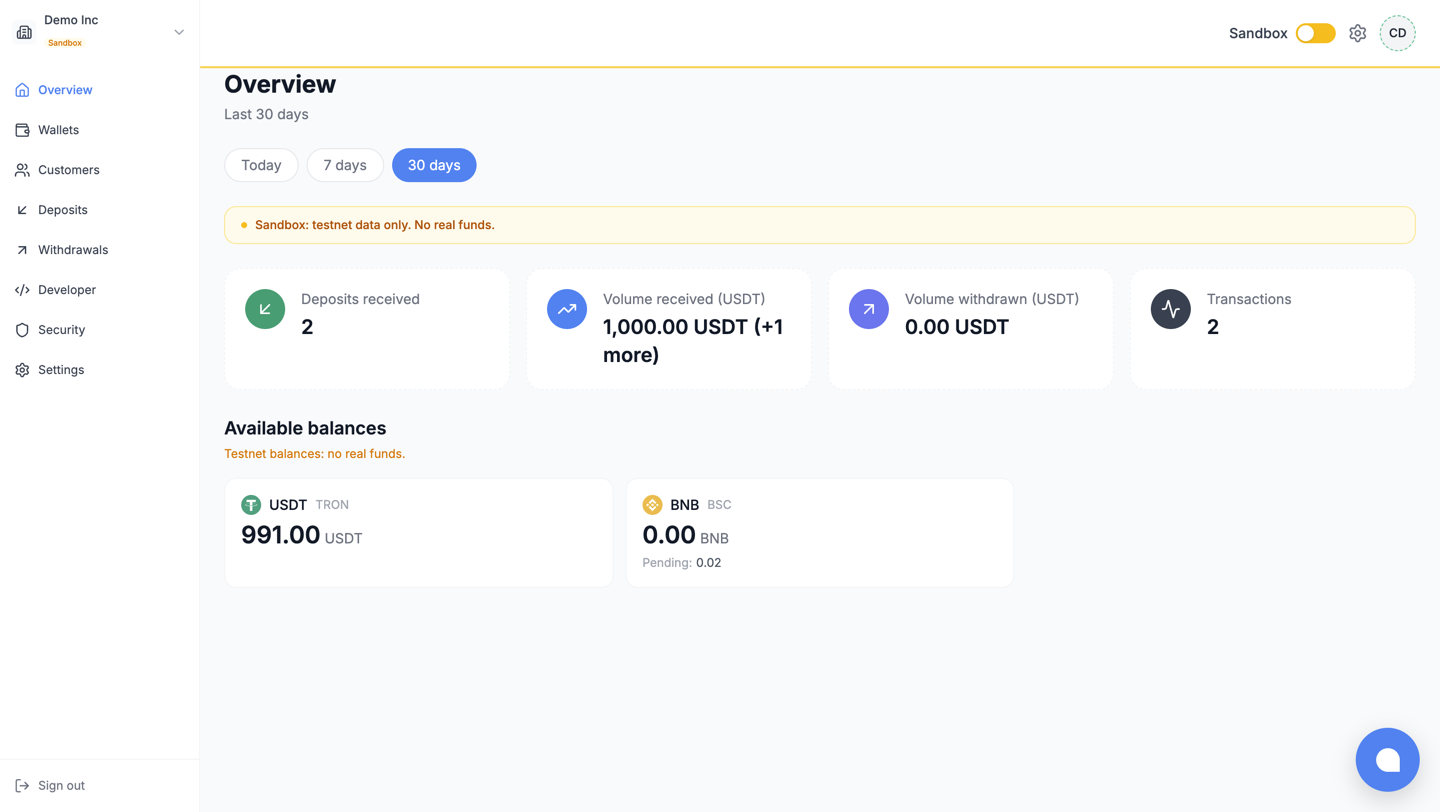
The sidebar is the product’s table of contents:
| Entry | What lives there |
|---|---|
| Overview | Balances and activity for the selected period (today, 7 or 30 days) |
| Wallets | Deposit addresses: create, filter, inspect |
| Customers | Your sub-accounts, when you use them |
| Deposits | Every incoming deposit, filterable, with its fee record |
| Withdrawals | Outgoing funds: create, track, approve |
| Developer | API keys and webhook endpoints |
| Security | Withdrawal allowlist, policy, limits, and your personal 2FA |
| Settings | Workspace name, KYB dossier, and the team |
The sidebar header names the current workspace and its mode badge: Sandbox in amber, Live in blue.
Sandbox and Live are one click apart
Section titled “Sandbox and Live are one click apart”
The header toggle switches every page between the two networks: wallets, deposits, withdrawals, keys and webhooks are all per network, and testnet views carry amber indicators so you always know where you are. On a workspace that is not live yet, the toggle opens the KYB flow instead of switching: Live exists once the workspace does.
Switching workspaces
Section titled “Switching workspaces”If you belong to several workspaces (your own plus clients’ ones, for instance), the workspace switcher appears in the header; one identity, one login, and each workspace keeps its own resources, roles and mode.
What each role can do
Section titled “What each role can do”Access is role-based, with per-member adjustments on top. The presets:
| Role | In short |
|---|---|
| OWNER | Everything, including billing and member management |
| ADMIN | Everything except billing |
| FINANCE | Money operations: withdrawals and their approval, beneficiaries; read elsewhere |
| DEVELOPER | Integration surface: wallets, transactions, API keys, webhooks |
| AUDITOR | Read-only everywhere, and can never hold withdrawal approval |
Two rules worth knowing before they surprise you: approving a withdrawal always requires the approver to have 2FA enrolled, and the member who created a withdrawal can never be the one who approves it.
What next
Section titled “What next”- Wallets and customers: the first resources you will create.
- Security: the page to visit on go-live day.